The Multi-Headed Daemon: Building a 24/7 Data Center Video Wall on FreeBSD
How I used a NVIDIA NVS 810, Xinerama, and shell scripting to create a resilient, 8-monitor NOC display that survives any power loss.

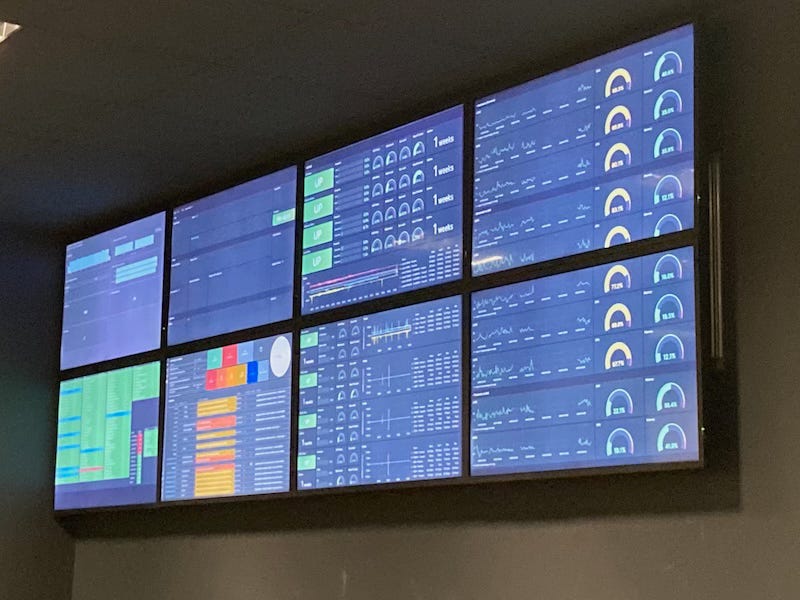
The Vision: The Eyes of the Data Center
When people think of FreeBSD, they think of high-performance storage or firewalls. They don’t usually think of a massive visual display. But when I needed a 24/7 monitoring wall for our Data Center, I knew that the “Power to Serve” was the only choice for a system that could never be allowed to crash.
We needed a “Digital Canvas” composed of 8 Philips monitors. I arranged them into two distinct 2x2 squares placed side-by-side. This wasn’t for watching movies; this was the “Eyes of the Operation,” displaying real-time metrics, Zabbix alerts, and Grafana maps.
The Hardware: Pro-Grade Stability
I didn’t need a supercomputer; I needed a system that wouldn’t overheat or fail under constant 24/7 load:
CPU: Intel Core i5 (Simple, reliable, low heat).
GPU: NVIDIA NVS 810. This card is a beast for 2D output, featuring 8 Mini-DisplayPort outputs.
The Connection: In a real-world data center, you work with what you have. I used 8 Mini-DisplayPort to VGAadapters to bridge the modern GPU to our monitoring screens.
The Software Stack: “No Frills” Engineering
I built everything from the FreeBSD Ports collection to ensure the binaries were optimized for the hardware.
Xorg: I chose the classic X server because its behavior is well-documented and stable for multi-head configurations.
Fluxbox: I avoided “heavy” desktop environments. Fluxbox is a lightweight Window Manager that stays out of the way. It’s fast, has zero “frills,” and is incredibly easy to script.
Firefox in Kiosk Mode: The final display was driven by multiple Firefox instances launched via a custom shell script.
The Secret of the Metamodes: Fighting the Bezel
The hardest part of any video wall is the “Gap”—the physical plastic borders (bezels) of the monitors. If you don’t account for these, your graphs and maps will look “broken” as they cross from one screen to the next.
I went straight into the xorg.conf and used NVIDIA Metamodes with BaseMosaic. By calculating exact pixel offsets, I compensated for the physical space between the displays.
# Example of my bezel compensation in xorg.conf
Section "Screen"
    Identifier     "Screen1"
    Device         "Device1"
    Option         "metamodes" "DFP-1:nvidia-auto-select +360+100, DFP-0:nvidia-auto-select +2400+100, DFP-2:nvidia-auto-select +360+1270, DFP-3:nvidia-auto-select +2400+1270"
    Option         "BaseMosaic" "on"
EndSection
To make the mouse move smoothly across all 8 displays as one unified desktop, I enabled Xinerama:
# grep Xinerama xorg.conf Option "Xinerama" "True"The “Brain” of the Wall: A Custom Startup Script
To make the video wall truly “set and forget,” I wrote a shell script that handles the dirty work of clearing browser locks and positioning windows with pixel-perfect accuracy using wmctrl.
export DISPLAY=":0"

FWAIT=2
NWAIT=1
WAIT=4
CMD='/usr/local/bin/firefox -kiosk'

# Firefox cleanup: Removing locks from unexpected power loss
killall -9 firefox
rm ~/.mozilla/firefox/py0bg83k.default-esr/.parentlock
rm ~/.mozilla/firefox/py0bg83k.default-esr/lock

exec $CMD &
sleep 1
killall -9 firefox

sleep $FWAIT
sleep $NWAIT

# Launching and positioning a specific Grafana Playlist
exec $CMD --new-window 'https://zabbix.in.tv.br:3000/playlists/play/pNue9HB4k' &
sleep $WAIT
wid=`wmctrl -l|tail -n1|cut -d" " -f1`

# Forcing the window to a specific coordinate on the 8-monitor span
wmctrl -i -r $wid -e 0,7726,16,1930,1171
wmctrl -i -r $wid -T "Monitoramento:inTV:001"
Why this matters:
Self-Healing: By removing the
.parentlockandlockfiles, I ensure that if the power cuts and the system reboots, Firefox doesn’t get stuck asking to “Restore Session.” It just starts.Pixel-Perfect Placement: Using
wmctrlallows me to bypass the Window Manager’s default placement and force specific dashboards to specific monitors in the 8-screen array.
Automated Resilience
The real power of this setup is that it is completely automated. Because it’s FreeBSD, if the power fails, the system BIOS is set to “Always On,” and the startup scripts automatically re-initialize Xorg, Fluxbox, and the Kiosk script. It returns to its perfectly configured status every single time without human intervention.
Conclusion: Why FreeBSD Was the Only Choice
In this environment, I didn’t use FreeBSD Jails because I needed direct, raw access to the NVIDIA hardware. However, the project perfectly illustrates why I call myself “The Jailed Engineer”: it’s about building systems that are hardened, predictable, and resilient.
FreeBSD allowed me to “hard-configure” every layer—from the X11 Metamodes to the Fluxbox window placement. While other operating systems struggle with automated recovery or driver instability, this system is truly automatic. In a mission-critical NOC, that peace of mind is the ultimate “Power to Serve.”